Routines
Work that runs without you. A Routine is a cron rule + a prompt + a repo, owned by the daemon. By default every firing creates a fresh task with its own worktree, its own branch, and its own engine session, carrying the prompt as that session's first message. A routine that needs to remember what it said yesterday can instead keep one standing session, or deliver into an existing task and tab.
That last part is the design, not an implementation detail. A run is not a hidden background job with a log file somewhere; it is an ordinary task in your sidebar that you can open, read, disagree with, and keep talking to. Scheduled work you cannot inspect afterwards is not worth scheduling.
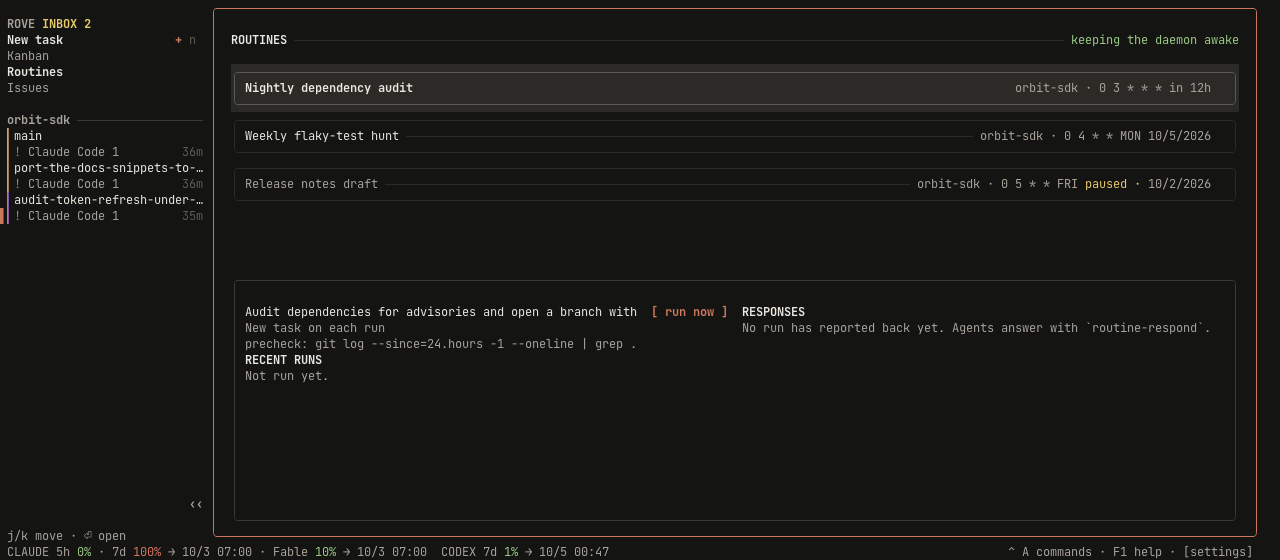
Two minutes to your first routine
The example throughout this page is the one in the screenshot: every morning at 03:00, audit this repo's dependencies and open a branch with the safe upgrades.
From the TUI
ctrl+a2(or click Routines in the sidebar rail) opens the page.nopens the composer.tab/shift+tabwalk the fields: name, repo (a scrolling picker over your projects), deliver to (new task or an existing task in that repo), the existing engine tab when selected, prompt, and schedule, five labelled cells (min / hour / day / month / weekday) where←/→picks a cell and↑/↓changes it. The composer restates the next fire time in your own clock as you type ("weekdays at 12:00 · in 2d · Mon 12:00"), so a cron expression you got wrong is visible before you save it.sruns it once, right now. Do this. It is how you find out the prompt works without waiting a day for the schedule, and it does not shift the next scheduled run.enteropens the task that run created. From here it is a normal session.
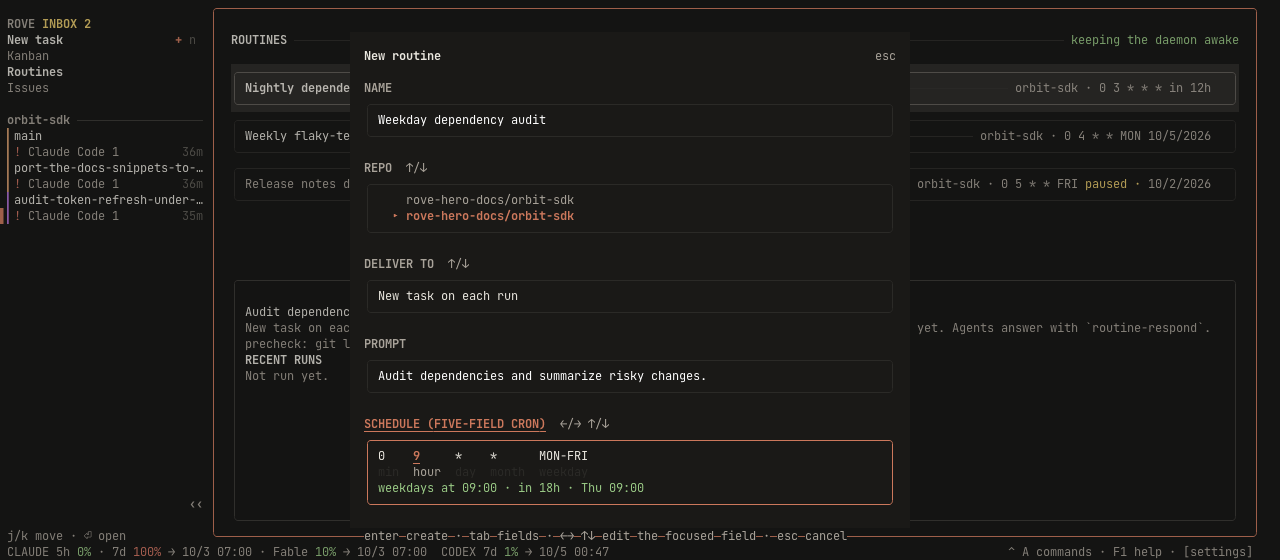
There is no in-page editing: recreate the routine, or use rove api routine-update. The composer carries name, repo, delivery target, prompt, schedule and the
confirm step; everything else is CLI-only — --precheck (below),
--precheck-timeout, --vendor, --model, --effort, --base-branch, --grace,
--persistent-session and --disabled.
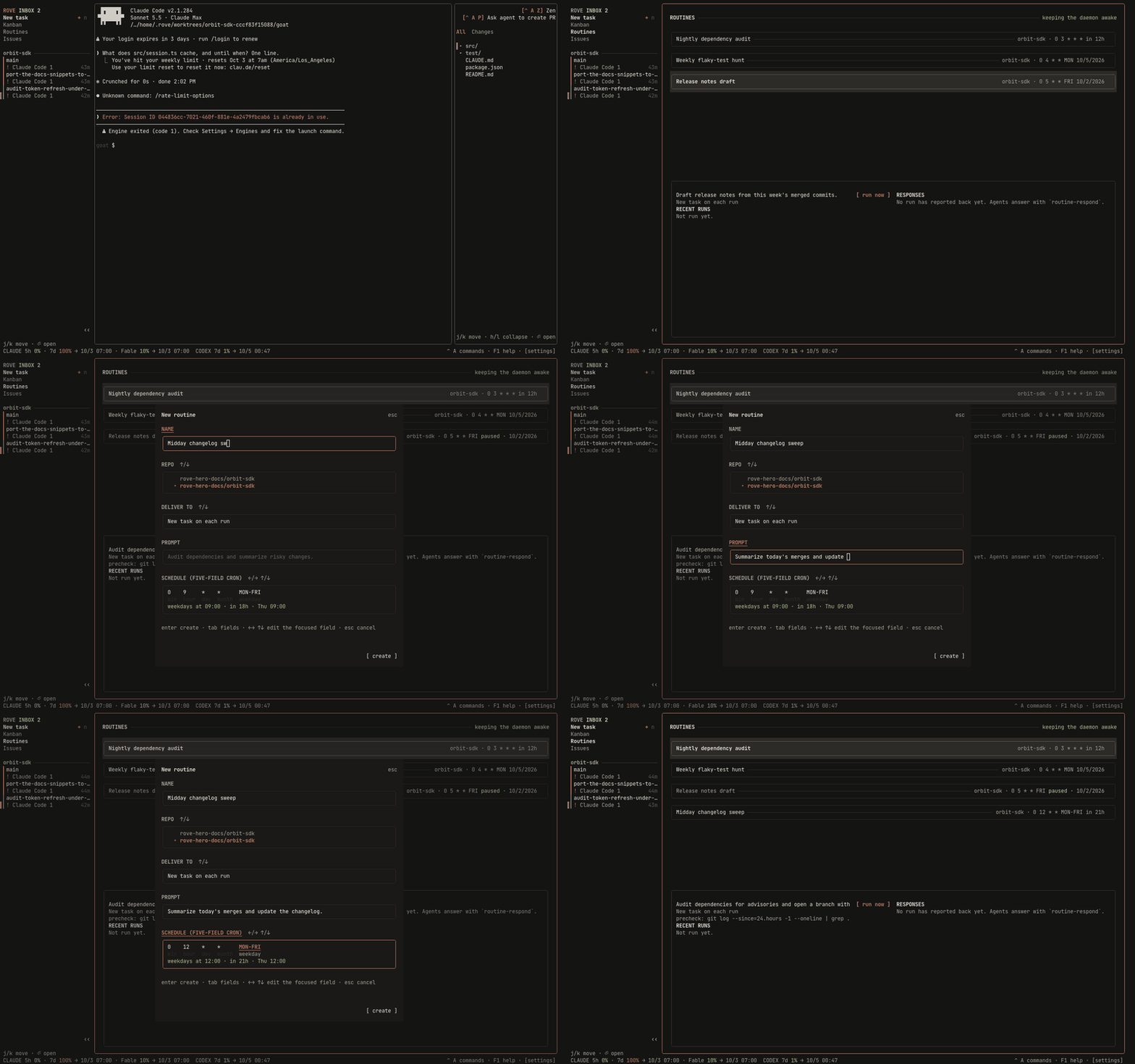
The page end to end: walking the schedules, pausing one, then composing a routine whose next fire time is restated in plain words as the cron cells change:
From the CLI
The same routine, with the precheck the TUI cannot set:
rove api routine-create --repo . \
  --name "Nightly dependency audit" \
  --prompt "Audit dependencies for advisories and open a branch with the safe upgrades." \
  --schedule "0 3 * * *" \
  --precheck "git log --since=24.hours --oneline | grep -q ."

rove api routine-list                       # every routine + its next run
rove api routine-run-now --id <id>          # fire it now, skipping the precheck
rove api routine-runs --id <id>             # run history, newest first
A prompt with backticks, $vars or quotes goes through --prompt-file
(- reads stdin), the same escape hatch send and add have. Inside double
quotes the shell runs a backticked command and ships its output instead of the
words:
rove api routine-create --repo . --name "Morning reply" --schedule "0 9 * * *" \
  --persistent-session --prompt-file - <<'EOF'
Reply via `rove api send --task-id $ROVE_TASK_ID` with what changed overnight.
EOF
--repo and --base-branch are checked when the routine is saved, not when it
fires: a path that is not a git repository, or a base ref that does not resolve
in it, is refused with a message naming the value. The check is not a guarantee
— a repo deleted after the routine was saved still fails at 03:00 — it just
catches the typo while you are still at the keyboard.
--model and --effort pin what every run's engine launches on, the same
values rove api add takes. They are checked when the routine is saved, so an
engine that has no reasoning levels refuses --effort at the keyboard instead
of at 03:00. The engine they are checked against is --vendor, else the
repo's default engine, else the built-in default (claude), and a pinned
routine stores that vendor: its runs launch the engine its pins were checked
against, even if the repo's default changes later. A routine with no pins and
no --vendor stores no vendor, and its runs launch the built-in default.
routine-update --model '' or --effort '' clears the pin. A
routine bound to an existing tab cannot set either: that tab keeps its own
engine. Changing --vendor also checks any retained pins against the new engine;
replace or clear incompatible pins in the same update. Clearing --vendor
while pins remain resolves the engine again the same way, checks the pins
against it and stores it; clearing it with no pins left stores no vendor.
Once a persistent routine has a standing task, updates cannot add, change or
clear its vendor, model or effort. This applies while the engine is live and
after it exits, and while the routine retains that task link in fresh mode.
Disable the routine with routine-update --id ID --enabled false, then create
a replacement with the desired pins. Repeating unchanged pins and editing
other fields remain supported. Binding to an existing tab clears the standing
link and uses that tab's engine settings.
--precheck-timeout only means something alongside --precheck; on its own it
is refused rather than quietly ignored. To change just the timeout, pass the
command again.
Full flag list: rove api schema --group routine, or rove api.
Reading the page
| Where | What it tells you |
|---|---|
| Header, right | Whether an enabled routine is keeping the daemon awake right now |
| Row | Name, repo, five-field schedule, and the next run in relative time (in 5h), or paused |
| Detail box | The selected routine's prompt, its precheck if any, and RECENT RUNS with their outcomes |
[ run now ] | The same thing s does; try it without waiting for the schedule |
Keys: j/k move, n creates, e pauses or resumes, s runs now, d
deletes, r refreshes, enter opens the task from the latest run, esc or q
closes the page.
Deleting removes the routine and its run history. Tasks it already created are
untouched. They outlive the schedule that made them — but they are not quite
ordinary: each carries a routine marker of its own, and the sidebar folds
marked tasks behind the N routine sessions row and skips them in the
cold-start "which task to open" fallback. Deleting a --persistent-session
routine therefore leaves its standing task folded behind an orphan row forever;
delete the task too, or open it explicitly.
To find them — a routine that has been firing for weeks has a task per run —
read the ids off its history before deleting it, since deleting takes the
history with it. History is capped at the 100 most recent runs per routine
(pruned on every write), so a */30 * * * * routine loses task ids after about
two days — collect them as you go rather than at deletion time:
rove api routine-runs --id <id> | jq -r '.runs[].taskId | select(.)'Then delete the ones you want with rove api delete --task-id <id>. Rove does
not sweep them for you: they are ordinary tasks, some may hold work you want,
and a schedule deleting tasks in the background is not a thing you should have
to expect.
The schedule
Five-field cron, in the daemon host's local time (there is no timezone field):
┌─ minute (0-59)
│ ┌─ hour (0-23)
│ │ ┌─ day of month (1-31)
│ │ │ ┌─ month (1-12)
│ │ │ │ ┌─ day of week (0-7 or SUN-SAT; 0 and 7 are both Sunday)
0 3 * * *| Expression | Fires |
|---|---|
0 3 * * * | Every day at 03:00 |
0 9 * * MON-FRI | Weekdays at 09:00 |
0 4 * * MON | Mondays at 04:00 |
*/30 * * * * | Every half hour |
Day matching follows the Vixie rule: when both day-of-month and weekday are
restricted they are OR'd, so 0 0 1 * MON means the 1st or any Monday, not
"a Monday the 1st".
The precheck: don't burn a turn on an idle repo
--precheck "git log --since=24.hours --oneline | grep -q ."The command runs in the repo, through your login shell, before the engine
starts. Exit 0 proceeds. Anything else skips the run without creating a
task: a non-zero exit, a timeout (120s by default, --precheck-timeout,
silently clamped to the range 1-600s — --precheck-timeout 900 runs as 600),
or a failure to spawn.
This is the cost control. The dominant waste in scheduled agent work is firing on time when nothing has changed: the engine still boots, still reads the repo, and still burns a turn to conclude there was nothing to do. A shell command answers that for free.
It fails closed on purpose. A broken precheck must never quietly degrade into
"run every time", which is exactly the cost it exists to prevent. run now /
routine-run-now skips the precheck entirely; asking for the run by hand is
the answer to "should this run?".
What each run did
Run outcomes are deliberately distinct rather than a single "didn't run", because unattended work is only trustworthy if one glance tells you whether a human is needed:
| Status | Meaning |
|---|---|
dispatched | A new task started with the prompt, or the prompt was delivered into a live standing or bound conversation |
revived | Standing session only: its engine had died, so it was respawned in the same worktree. The files carried over, the conversation did not |
skipped_cancelled | The routine was disabled, edited, deleted, or its runner stopped before delivery |
skipped_precheck | The precheck said there was nothing to do. Healthy |
skipped_missed | The occurrence was older than the grace window, or the sweep never reached it. A busy sweep no longer drops occurrences silently: one row records how many were passed over and when the first was due |
skipped_unavailable | The dispatch threw before it produced an outcome — the repo or worktree could not be resolved, but a branch collision, a worktree-creation error or a full disk lands here too. The error field names which. Needs you |
dispatch_failed | The prompt did not reach an engine — the engine process never started. Needs you |
skipped_precheck and dispatch_failed are opposite signals; they never share
a label.
dispatched means the engine PROCESS was seen running — not that the terminal
opened. An engine whose launch command points at something that is not there
exits immediately and leaves the login shell behind it, and the terminal is
alive either way; a run that ends that way records dispatch_failed with the
engine's own Engine exited (code 127) line in error. That check costs a
firing nothing when the engine is fine and a few seconds when it is not.
What each run concluded
A run record says the prompt was delivered. What the agent concluded is its response, and every delivered run can carry one. The daemon prefixes each routine prompt it delivers (new task, standing session, or bound tab) with one line naming the run, then a blank line, then your prompt unchanged:
[ROVE ROUTINE] "morning audit" run #12 — when done, report with: rove api routine-respond --run <runId> --prompt-file -

<your prompt>
The agent answers that run:
rove api routine-respond --run <runId> --text "No new failures since yesterday."
rove api routine-respond --run <runId> --prompt-file report.md # `-` reads stdin- One response per run. Responding again replaces it.
- The cap is 32,000 characters. Over it the verb refuses (
RESPONSE_TOO_LARGE) instead of truncating. - An unknown or pruned run id is
RUN_NOT_FOUND. - There is no fallback. An agent that never calls the verb leaves the run without a response; Rove does not read transcripts to guess one.
A delivered run (dispatched or revived) with no response reads as
awaiting response for two hours, then no response, in the warning
colour. A response raises an Inbox entry (one per routine, the newest
replacing the last) that opens the Routines page. On the page, the selected
routine's detail splits in two: run history on the left, its responses on the
right, newest first, each headed by its run number, status and time, with the
text rendered as markdown. routine-runs includes response ({text, at})
on every answered run.
You do not have to go looking
The two statuses marked Needs you raise an entry in your Inbox, and the
Routines page marks the row — † an engine that would not start, ! a
routine whose target is gone, ✓ a healthy last run, · nothing to do — with
a count of how many need you in its header. One entry per routine, refreshed
rather than repeated, so a routine failing every minute is one line and not
1,440; it clears itself when the routine runs cleanly again.
Deliver into an existing conversation
Use this for a prompt that belongs in a conversation you already opened. Get the
exact tab id from rove api get-task --task-id TASK_ID, then bind both ids:
rove api routine-create --repo . --name "Check this conversation" \
  --schedule "*/15 * * * *" --prompt "Check the current work and report progress." \
  --target-task TASK_ID --target-tab tab-2
rove api routine-list
rove api routine-run-now --id ROUTINE_ID
rove api routine-runs --id ROUTINE_ID
rove api routine-update --id ROUTINE_ID --target-task TASK_ID --target-tab tab-3
rove api routine-update --id ROUTINE_ID --enabled false
The composer also offers Deliver to. Select an existing task with the current
up/down controls, then enter its engine tab id. The detail panel shows the bound
task and tab; each delivery receipt carries taskId and tabId. Existing
e pause/resume, s Run now, and the visible Run now button use this target.
Use the API to edit a saved routine, as with its other fields.
The public binding is target: {kind: "existing-tab", taskId, tabId}. Omitting
target from an update preserves it. target: null clears it; the CLI spelling
is --target-task '' --target-tab ''. Both CLI flags must be supplied together.
Clearing returns to new-task behavior. Old records without a target retain their
original fresh-task or standing-session behavior.
The routine repo must match the target task's repo. A bound directory task
does not require a git repository because the routine creates no worktree. An existing binding cannot
also set vendor, model, effort, baseRef or persistentSession, including values already
stored before an update. Clear those values in the same update when switching
modes: --vendor '' --model '' --effort '' --base-branch '' --persistent-session false. The target
keeps its own engine, worktree and conversation; routine runs never change its
ownership or add a task or tab. Its precheck still runs in the routine repo.
Scheduled and manual delivery use the same exact-tab gate. A missing or deleting
task records skipped_unavailable. A missing tab or exited engine records
dispatch_failed. None of these creates a replacement, selects another tab, or
revives an engine. Repair the target or retarget the routine explicitly.
Delivery is unconditional: the prompt is pasted into the target tab's engine and submitted, whatever its composer holds. Disabling or deleting a routine stops future scheduling; it does not retract a prompt already delivered.
The runner persists an occurrence claim before delivery, so overlapping ticks and a daemon restart cannot deliver that scheduled occurrence twice. It checks for disable, edits, deletion and stop again after precheck and before handing the prompt to delivery. An already handed-off prompt may finish. This is at most once, with a crash limitation: a crash after claim persistence but before delivery can lose that occurrence, and a crash before its run receipt is saved can leave no receipt. Restart does not retry that claimed occurrence. Unclaimed due occurrences follow the normal missed-run grace policy.
One standing session instead of a task per run
A routine that asks the same question every day — is CI slower than last week? — is worthless starting from zero each morning. Give it a standing session and every firing lands in the same task, as another turn in one conversation:
rove api routine-create --repo . \
  --name "CI trend" \
  --prompt "How do this week's CI times compare with last week?" \
  --schedule "0 9 * * MON-FRI" \
  --persistent-session
Leave it off for a routine that edits code. A fresh worktree per run is what makes each result a branch you can review and land; a week of runs piled onto one branch is a branch nobody can merge.
Where its output goes
The standing task does not sit in your sidebar as another row. It rests behind a
N routine sessions count row under its project — press enter on that row
to open it and see them, enter again to close. Seven daily routines would
otherwise be forty-nine rows a week competing with the handful of tasks you
opened yourself.
Hidden at rest is not hidden: the task is still found by / search, still opens
from the Routines page (enter on the routine), and still raises an Inbox
entry when its turn finishes or it needs you. That entry is how you learn what
last night's routine said — you do not go looking for it.
While the row is closed, it also names how many of those sessions are blocked on
you (3 routine sessions · needs you: 1): a permission prompt, a quota wall that
will not clear itself, or an error that has settled. A stalled routine makes no
progress until you answer it, so the fold never hides that.
It also never wins the "which task should I open?" fallback on a cold start. A routine that fired at 03:00 is genuinely the most recently touched task in the install and the least likely one you meant; opening Rove lands on your own work instead.
When the engine has exited
Continuity comes from the engine's own live conversation, which the PTY host
keeps alive across daemon restarts. When that process is gone — an overnight gap
usually means it is — the next firing respawns it in the same worktree. The
files and the branch carry over; the transcript does not, and that run is
recorded as revived rather than dispatched so a run that started over never
reads like one that had yesterday in front of it.
If the standing task is deleted, the routine simply builds a new one on its next firing rather than failing forever.
Restarts, and runs you missed
The next run is stored as an absolute timestamp on disk, never an in-memory timer. A daemon that restarts, or that was down for a day, rediscovers every armed schedule on its first sweep, with no re-arm step and no lost schedule.
If the daemon was down when a run was due, the occurrence still runs late as
long as it falls inside the grace window (--grace, minutes). Down at 09:00,
back at 09:20 with a 60-minute grace → it runs. Back at 14:00 → skipped_missed.
Only the most recent missed occurrence is ever considered. Three days offline produces one run, not three: a stampede at boot is worse than a gap.
A pause is not downtime. Resuming a paused routine arms it for its next
occurrence after the resume; the occurrences that fell inside the pause neither
run nor record skipped_missed.
The daemon stays awake for you
Rove's daemon normally stops a few seconds after the last GUI detaches. An
enabled routine holds it open, because a schedule that only fires while
someone is watching Rove is not a schedule. The header says so while it is
happening, and rove daemon status reports the hold, so a daemon staying up for
a schedule does not read as a leak.
The hold releases when the last routine is deleted or disabled, restoring ordinary idle shutdown. See Sessions for the rest of the daemon's lifetime rules.
Limits
Known and deliberate, as of today:
- A standing session's engine, once it has exited, comes back without the previous transcript (see below).
- No timezone field; schedules are the daemon host's local time.
- No per-run cost attribution, and no remote/SSH execution target.
See also
- rove api: every
routine-*verb and flag. - The TUI: the Routines page among the other pages.
- Concepts: what a task is, and why a run being one matters.
- design/automations.md: internal design note, the sweep, the cron implementation, the daemon-lifetime hold.